

Release Notes
June 2025
HAPI Enhancement: Autocompletions
We've made it easier for you to use HAPI scripts in the code editor by offering helpful autocompletion functionality that automatically suggests scripts as you type. You can refer to our HAPI documentation for more details, or take a look at our demo video below:
May 2025
Updated Deprecation Reports
In March, we announced the introduction of a new Deprecation Report following on from Atlassian's REST API search endpoints deprecation, as outlined in our Breaking Changes.
The report was initially provided to help identify any deprecated search endpoints currently in use within your instance. We've now expanded it to include Parent and Epic Link fields due to Atlassian's upcoming deprecations, details of which you can find in our Breaking Changes section.
Atlassian Deprecation of Parent and Epic Link Fields
Atlassian have announced that parent and child issue associations are being standardised, resulting in the deprecation of the Epic Link and Parent Link custom fields in the REST API and webhooks.
Parent Link Deprecation
Date of Change: June 13th 2025
Epic Link Deprecation
Date of Change: September 13th 2025
Check out our Breaking Changes section for more information.
Date Change for Atlassian REST API Search Endpoints Deprecation
In March, we announced the Breaking Change that search endpoints would be deprecated after May 1st 2025. We're pleased to share an update: the deprecation date has now been extended to August 1st 2025.
HAPI Method Removal Notice
The following HAPI methods are scheduled to be removed on August 1st, 2025 as they are only available in HAPI for ScriptRunner DC.
Groups.getByName("administrators").add(String accountId)Groups.getByName("administrators").add(User accountId)
Enhanced Search: New Additional JQL Parameter
We've introduced an optional second JQL query within the childrenOf(Subquery) function to further filter descendant issues. We strongly recommend you use this new second parameter option as it provides an effective way to narrow down and speed up search results provided by childrenOf.
Documentation Enhancements
Our ScriptRunner Migration to Cloud documentation has been updated. In particular, the Rewrite Scripts for Cloud Hints and Tips page now contains additional content providing step-by-step instructions, best practice tips, and examples to help support your migration from ScriptRunner for Jira Server/Data Center to ScriptRunner for Jira Cloud.
April 2025
Deprecation Reports
Following our notice last month regarding Atlassian's REST API search endpoints deprecation that will no longer be available after May 1st 2025, we have introduced a new Deprecation Report.
You can use this report to identify any deprecated search endpoints currently in use within your instance. Check out our Breaking Changes section for more information.
March 2025
Atlassian's New Transition Experience Compatibility with Jira Expressions
Atlassian's new transition experience in Jira is being permanently rolled out from April 2025. As a consequence, how your Jira expressions (conditions and validators) work will change.
Check out our Breaking Changes section for more information.
Atlassian REST API Search Endpoints Deprecation
The following Jira Platform REST endpoints will be deprecated and no longer available for use after May 1st 2025:
GET /rest/api/2|3|latest/searchPOST /rest/api/2|3|latest/searchPOST /rest/api/2|3|latest/search/idPOST /rest/api/2|3|latest/expression/eval
Check out our Breaking Changes section for more information.
Results Page UI Update
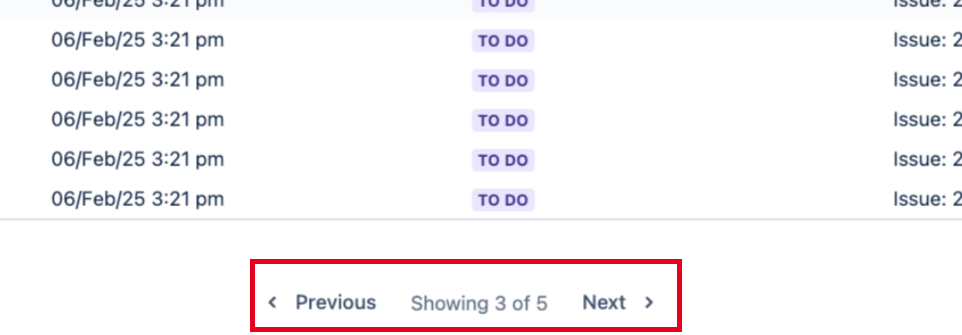
Currently, when your search results return several pages of information in the ScriptRunner for Jira Cloud Enhanced Search app, you navigate through them using page numbers.
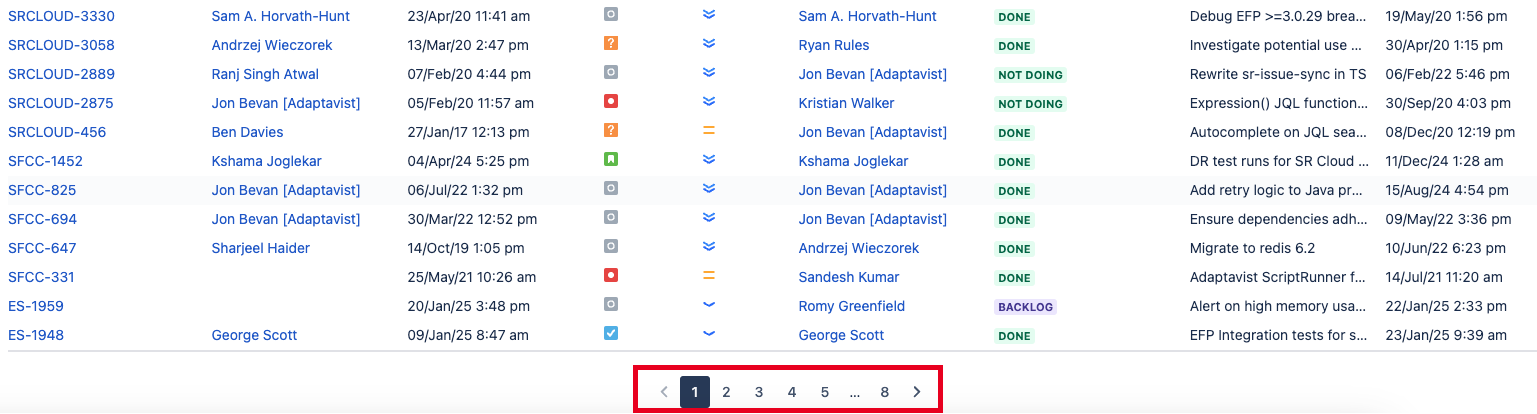
We have updated our UI and now use Previous and Next options, along with an indication of the number of pages.
Gradual Roll-out
HAPI Enhancement
EntityProperties
You can now work with entity properties using HAPI. Check out the Work with Entity Properties page for more information.
January 2025
Behaviours Now Available on Team-Managed Projects
We have expanded the functionality of the Behaviours feature. Now, your behaviours can be applied to both company-managed projects and team-managed projects.
Refer to Behaviours Supported Fields and Products for more information.
HAPI is Live!
HAPI gives you a simplified way to define your Jira automations in Groovy.
Our major scripting innovation is now available to use in ScriptRunner for Jira Cloud. HAPI is an API optimized for Jira automations and integrated within the script editor. It enables you to create automations and customizations faster than ever.
Take a look at our HAPI documentation to find helpful examples, videos, and much more.
HAPI library scripts
We've updated a number of Library scripts to include HAPI methods. If you have used any of these Library scripts in the past, you'll notice that the release of HAPI means they're now shorter and easier to understand.
New Behaviours Transition View
The ScriptRunner for Jira Cloud Behaviours feature has expanded from working only on the Global Issue Create and Issue views to now include the additional Transition view.
This means that Behaviours can be applied to this view to dynamically control how fields behave (e.g., making fields required, hidden, or pre-filled) during an issue transition. It's worth noting that not all field types are supported for Transition view, as outlined in Behaviours Supported Fields.
You can watch our video below to understand how this functionality can be used:
December 2024
Additional Supported Fields for Behaviours
Check out all the latest Supported Fields for Behaviours, as we now support the Cascading Select field on Issue and Create views.
On Issue view we now also support the Original Estimate field.
Documentation Enhancements
We have incorporated several new videos into our ScriptRunner Enhanced Search section and enhanced the content to improve usability and ease of reference. Specifically, we have added new demo videos to several parts of the ScriptRunner Enhanced Search JQL Functions chapter and introduced a Troubleshoot ScriptRunner Enhanced Search section.
November 2024
New Behaviours on Screen Tabs
To improve clarity and usability, especially for issues with a large number of fields, we now support screen tabs in Behaviours on both Create and Issue views. These tabs help organize fields on issue screens into separate, easily navigable sections or tabs, effectively reducing clutter and making it easier to find specific fields.
You can refer to our Behaviours API page for more information and view our helpful example video demo.
Atlassian's Epic Link field
Customized Epic Link field
If you've renamed or customized the Epic Link default field in your Jira instance, you may notice issues with epic-related queries, such as:
Failures with getting automatic syncing and the most up-to-date results.
Epic-related JQL functions (e.g.,
epicsOf, linkedIssuesOf) not returning expected results.
Atlassian has deprecated the Epic Link field and now recommends using the Parent property to link to epics. Since the Epic Link field was customizable, any epic fields that you have renamed or customized are no longer supported in JQL queries.
Search Time Limit Improvement
Currently, if a JQL search takes more than 30 seconds to complete on the ScriptRunner Enhanced Search page, it times out and returns no results. This primarily affects Jira instances that contain large projects.
To help you obtain search results from long-running queries, we have increased the 30-second limit to 2 minutes for the search bar only. If you save this as a filter, automatic syncing won't work, and you will need to run the query in the search bar again to get the most up-to-date results.
The new time limit also includes UI improvements, such as a progress bar and an estimated run time for queries.
Additional Supported Fields for Behaviours
We now support the following fields for Behaviours on the Create view:
- due date field
- target start custom field
- target end custom field
Check out all the latest Supported Fields for Behaviours.
October 2024
New Example Scripts in-app
We've updated all code editors within ScripRunner for Jira Cloud to include a new Example scripts button, as shown in our Script Listener example below:
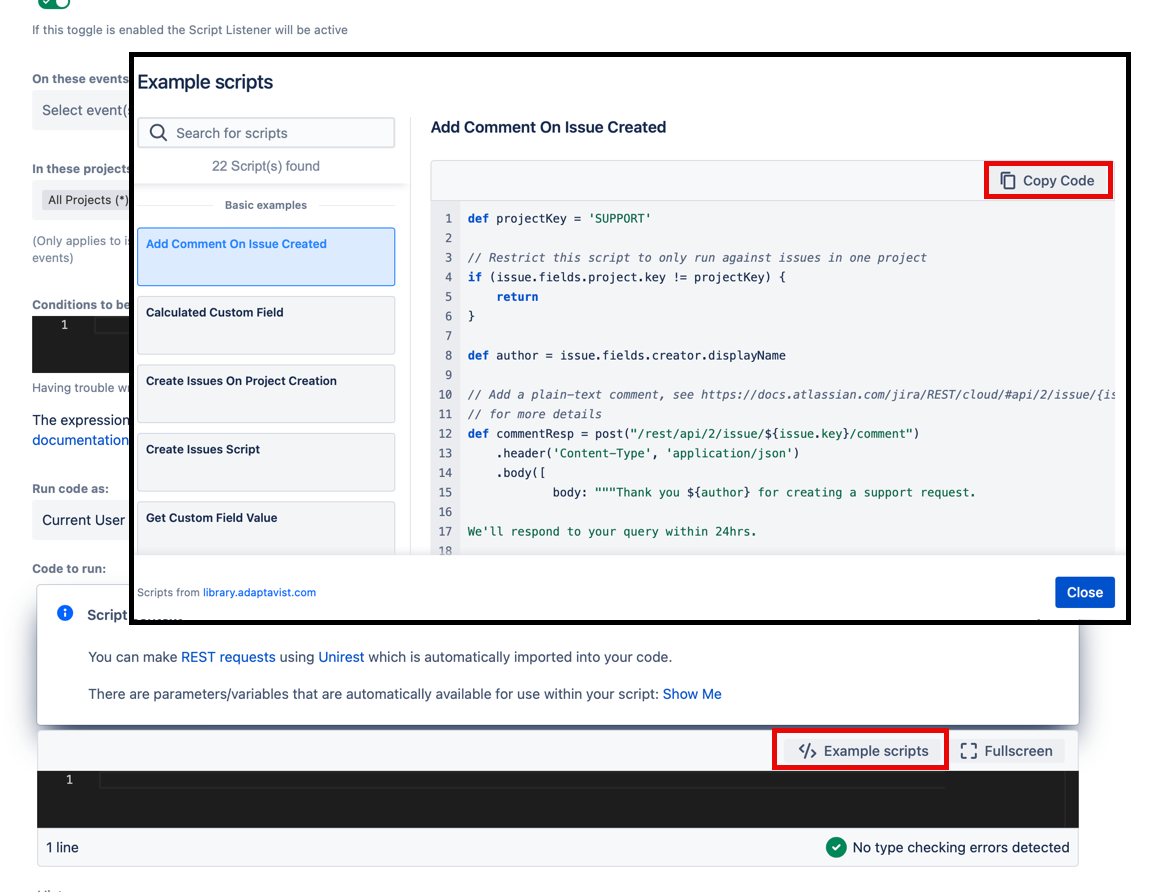
You can now click the Example scripts button, which opens a modal screen containing a list of examples relevant to the feature you are using. Select your preferred example and the associated code displays automatically. Copy the code using the Copy Code button and paste it into the code editor to reuse.
This improvement means you no longer need to leave your current task to open a separate Adaptavist Library window, as the in-app examples are identical to those provided there.
September 2024
Additional Supported Field for Behaviours
Check out all the latest Supported Fields for Behaviours. We now support the Status system field on Issue view.
Java Version Upgrade
We have upgraded the execution environment where your scripts run from Java 11 to Java 17. See Breaking Changes for more details.
May 2024
Performance and Reliability Improvements
We are no longer updating the search results for Enhanced Search saved filters that have not been used in Jira for 2 months or more. Specifically, using the saved filter refers to viewing it in a Jira search, a dashboard or an agile board powered by the filter, or other such instances, such as being part of a Confluence macro that uses the filter. Note that viewing the search results for those saved filters does not count as actually using them.
April 2024
Additional Supported Fields for Behaviours
Check out all the latest Supported Fields for Behaviours, as we now support the Parent system field on the Create view and the Parent, Components, Reporter, User Picker and Multi User Picker on Issue view.
Improved Behaviours mapping
You can now create a Behaviour on a field that is applied to all issue types or all projects. Being able to map to all projects or all issue types removes the need to select each project or each issue type individually, which can save time if you have an instance with hundreds or thousands of projects.
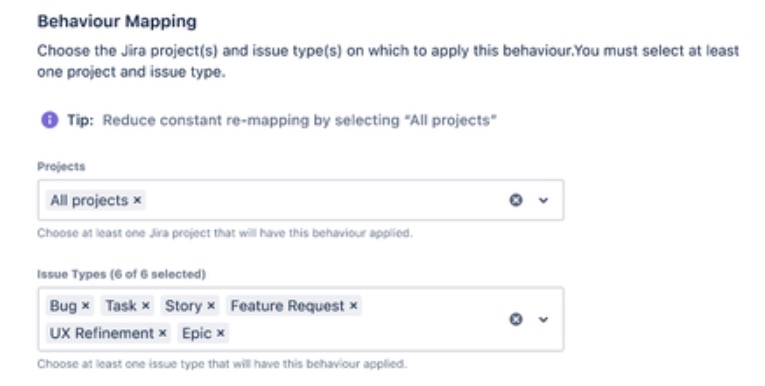
Behaviours mapping note
March 2024
New Code Editor
We've replaced our in-app editor component with a new code editor.
Importantly, this gives us a platform for future improvements. However, there are immediate benefits to this release: you get inline documentation (press Control+Space when completions are open), hover over methods and classes to see documentation, see completions automatically as you type, find and replace, and more.
This editor has autocomplete for the following code:
- Groovy
- Atlassian REST API
- Custom ScriptRunner-defined script variables
New support portal
Our Adaptavist Support Portal has moved! Please update your bookmarks.
Visit this page for help logging into the portal.
Support for issue type events for Jira admin webhooks
We now support the following Jira admin webhook events: issuetype_created,issuetype_updated and issuetype_deleted whenever an issue type entity is created, updated or deleted.
New Behaviours Custom Field
We have introduced the new date time picker field for Behaviours Create and Issue View.
February 2024
Additional Supported Fields for Behaviours Issue View
Check out all the latest Supported Fields/Methods for Behaviours on the Issue view, as we now support the get/set description method.
Scripted Fields now act like Jira Custom Fields
We are currently rolling out the changes to the Scripted Fields feature, so you should see the update over the next couple of days.
As we previously announced, significant changes have been released for how Scripted Fields are configured in ScriptRunner for Jira Cloud and how they work. Now, every time a scripted field is created, a Jira custom field will also be generated on your Cloud instance.
You will add your script to the scripted field in ScriptRunner but configure the field anywhere you'd like within Jira's configuration screens, just like you would with any other custom fields.
If you have existing scripted fields, they will automatically update to the new way of working.
This means you will see a new custom field for every existing scripted field you have saved.
If your Scripted Field was:
- Disabled - the corresponding custom field will not be configured on a screen and, therefore, not shown to any users.
- Enabled - we will take the current project/issue type mapping and match it to Jira's configurations using a combination of field context and adding it to the proper screen/s.
Mapping
New JQL Function: childrenOf
Introducing the childrenOf function, a powerful addition that enables you to find descendant issues of a given subquery, including children, grandchildren, and beyond. This function enhances your ability to drill down into the specifics of project elements, offering a more detailed view of issue relationships.
For example, you could use this new function to find children issues of a project, excluding subtasks: issueFunction in childrenOf("project = DEMO") and issueType != "Subtask"
Updated JQL Functionality: parentsOf
The parentsOf function is now more robust, enabling you to find ancestor issues of a given subquery, including parents, grandparents, and beyond. This expanded capability allows for more comprehensive and hierarchical searches within your projects.
To utilise this feature, simply add a second argument with the string “all” to your query.
For example: issueFunction in parentsOf("project = DEMO", "all")
January 2024
Script Listener Infinite Loop Restriction Added
Previously, it was important to ensure that your scripts did not inadvertently trigger events your script listener was listening for, as this risked causing an infinite loop. However, now, self-triggering scripts cannot execute after 1000 runs. This restriction means that if a script creates an event that results in the same script running again, ScriptRunner will count the number of times this occurs and reject the 1001st run. If this occurs, you will see a log message informing you that Scriptrunner has cut off a self-triggering script loop.
Additional Supported Fields/Functions for Behaviours
Check out all the latest Supported Functions and Supported Fields for Behaviours, as we now support the FixVersion/s system field on the Issue view and number custom field types on both the Create and Issue views.
Increased script timeout limits
We have increased the duration of timeouts for script executions!
The previous limit was set at 120 seconds; now, we have increased this limit to 240 seconds for script executions.
Coming Soon!
Scripted Fields are becoming Jira Custom Fields
What's happening?
Currently, Scripted Fields are entirely created and saved within ScriptRunner. This includes the mapping selection of the Scripted Field as well as giving it a search term in order to find it using JQL in Jira. Very soon, we'll be releasing an upgrade where every time a Scripted Field is created, a Jira custom field will also be generated on your Cloud instance. You will add your script to the Scripted Field in ScriptRunner but configure the field anywhere you'd like in Jira's configurations, just like you would with any other custom fields.
Some of the benefits of having a Scripted Field as a custom field include:
- Better display and user experience
- Improved discoverability
- Increased flexibility since you'll be able to move custom fields anywhere you'd like on a screen
What about my existing Scripted Fields?
If you have existing Scripted Fields, they will automatically update to the new way of working.
This means you will see a new custom field for every existing Scripted Field you have saved (without having to lift a finger!)
If your existing Scripted Field is:
- Disabled - it will become a custom field, but it will not be configured on a screen and, therefore, not shown to any users.
- Enabled - we will take the current project/issue type mapping and match it to Jira's configurations using a combination of field context and adding it to the proper screen/s.
For example:
- Old Scripted Field mapping:
- Project: TEAM / issuetype: Story
- New Scripted Field mapping:
- Field context limit to only project TEAM, and only issuetype Story; Added to the screen which is mapped to the project TEAM and issue type Story.
Note: Field context is necessary in the event that your issue type screen scheme has mappings to multiple projects and/or issue types that are not in your original mapping.
The new location of your Scripted Field will default to the bottom of the screen of the side panel. You may move this to anywhere you please by updating the screen and/or configuring the issue layout.
What will happen to my saved filters that include a Search Term in the JQL?
Your filters will be updated to use the Scripted Field's name.
November 2023
Additional Supported Fields for Behaviours Create View
Check out all the latest Supported Fields/Methods for Behaviours on the Create view, as we have added to those listed earlier in the month.
New Behaviours Issue View
We have expanded the functionality of the ScriptRunner for Jira Cloud Behaviours feature, so it's now possible to use behaviours on the newly added Issue view along with the Create view. Watch our latest video showing how to use this functionality.
It's worth noting that not all field types are supported for issue view. You can refer to the details outlined in Supported Fields/Methods.
October 2023
Groovy Version Upgrade
We updated ScriptRunner for Jira Cloud to Groovy 4 on October 4 2023!
Other new features in Groovy 4:
The following are the most significant new features that have been added in Groovy 4 :
- Switch expressions which, unlike switch statements, are optimized towards branches that handle one case and break out rather than fall through to the next case.
- Sealed types
- Records
- Ranges have been enhanced with support for ranges open on the left, for example, 3<..5, or both sides, for example, 0<..<3
- Support for annotating generic types, for example List<@IntRange(min = 0, max = 10) Integer>
Please have a look at the Groovy 4 Release Notes for a complete list of new features.
Visit Breaking Changes to learn how Groovy 4 could affect and break your scripts.
September 2023
New Behaviours Issue Type Supported
We have added support for the Issue Type field to behaviours.
New Behaviours Project Type Supported
Behaviours now support Company Managed Work Management projects.
New Behaviours API Method
The new getContext() method has been added to the Behaviours API.
August 2023
Rich Text Scripted Fields
We have added some new functionality to Scripted Fields, which means you can now use rich text. Check out our script example in the Adaptavist Library. You can also watch our demo video showing how to display tables within scripted fields using rich text.
Notice of Deprecated JQL Keywords
We've identified a few keywords that are either not functioning as expected or already have their use cases covered by Jira Search. As a result, the following keywords will be removed on 1 November 2023:
hasLinkscommentVisibleGroupcommentVisibleRoleworklogVisibleRoleworklogVisibleGrouplastCommentVisibleRolelastCommentVisibleGroupissueLinkType
You should review any queries related to these and change them accordingly. For example, you could use issueLinkType (which is provided by Atlassian here) in queries where you currently use hasLinks to search for issues based on the type of issue links you have.
July 2023
New Component and fixVersion Fields
You can now use the component and fixVersion fields in your behaviours, as shown in the getValue and setValue methods of the Behaviours API page.
New Behaviour API Methods
The new getOptionsVisibility and setOptionVisibility(options,isVisible) methods have been added to the Behaviours API.
Atlassian JQL Bug Affecting Assignees
Atlassian is currently aware of a bug that affects assignee in (...) when used with display names. This bug can cause inconsistent results when the JQL is executed within an Enhanced Search query.
Atlassian is working on a fix for this bug, but there is no ETA for the release. In the meantime, you can use account IDs instead of display names in your JQL queries as a workaround.
For example, instead of assignee in ('John Doe', 'Jane Doe'), use assignee in (1234567890, 9876543210).
June 2023
New Behaviours UI
We've made it easier to directly add Behaviour scripts, replacing the Behaviours Fields section with the new Behaviours Scripts one.
May 2023
New Behaviours System Field
We have introduced the new reporter system field function for Behaviours.
April 2023
New Behaviours Custom Field
We have introduced the new custom checkbox supported field for Behaviours.
New Behaviour API Method
The new getType method has been added to the Behaviours API.
Behaviour API Method Property Deprecated
Refer to Atlassian's documentation for more details regarding this deprecation.
The usage of the getValue and setValue methods has changed for several field types. Refer to Behaviours API for more information.
For the assignee, userPicker and multiUserPicker fields, only accountIds are returned as the displayName property is no longer available. Scripts that rely on displayName information will break; instead, you will now have to make a request to /rest/api/3/user?accountId= and/or ${accountId}/rest/api/3/bulk?accountId==${idsToFetch.join("&accountId=")}.
For single and multiselect, you must use the id of the option istead of an object containing the id and name.
March 2023
New Behaviours API Methods
New methods have been added to the Behaviours API: isRequired and setRequired.
Jan 2023
New Behaviours Custom Fields
We've gone beyond the recent introduction of Behaviours for ScriptRunner for Jira Cloud that supported actions on five key system fields: priority, summary, assignee, labels and description - now, you can use Behaviours on your custom fields. These include:
- Custom single select fields
- Custom multiple select fields
- Custom paragraph (multi line text) fields
- Custom user picker fields
- Custom multiple user picker fields
- Custom text field
Read more in our blog.
Dec 2022
New Behaviours Feature
We've introduced Behaviours for ScriptRunner for Jira Cloud: gain control over fields, expand standard configurations and customise how fields behave. Read more in our blog.
One of the most popular ScriptRunner for Jira features is now also available on Cloud. Behaviours deliver a brand new boost to your Jira customisation power, allowing you to conditionally change how fields behave when creating a new issue under a specific project or issue type.
Nov 2022
Get involved
Want to know how you can get involved with shaping the future of ScriptRunner? Check out our Get Involved page.
March 2022
A new Migration report is available that displays any failed items after you have migrated from ScriptRunner for Jira for Server/DC to Cloud using the Jira Cloud Migration Assistant.
Feb 2022
UI improvements have been made to the Script Fragments page.
Feb 2022
New example scripts have been added to the Scripted Fields page.
Jan 2022
UI improvements have been made to the Scripted Variables page.
Dec 2021
Saved Enhanced Search filters can be accessed and shared directly from ScriptRunner Enhanced Search page.
Nov 2021
UI improvements have been made to the following pages:
April 2021
- Database connection calls can now be made via groovy within ScriptRunner for Jira Cloud, meaning that you can read or write to a database as part of a script. Refer to the Script Examples page.
- The list of libraries from which you can import packages into your scripts has increased to include:
- org.codehaus.groovy:groovy-sql:2.5.12
- org.postgresql:postgresql:42.2.19
- mysql:mysql-connector-java:8.0.23
- com.microsoft.sqlserver:mssql-jdbc:9.2.1.jre11
March 2021
- Added the ability to use Scripted Fields when searching for issues with JQL.
February 2021
- Added new Built-in Script for cloning issues in bulk and moving to a new project.
Apr 2020
Menu items have been consolidated in the UI to improve navigation. Escalation Services, Script Variables, and Script Fragments are now found under the More drop-down.
7 Jan 2020
Added ScriptRunner Script Conditions and Validators that can be added to a workflow transition.