
Preserve your Incident Updates for Statuspage Data
Incident Updates for Statuspage is being retired. Before the app is retired, you may want to save the link between each Jira work item and its associated Statuspage incident for your records.
Two supported data-retention paths are outlined below:
Preserve your Statuspage incident links on Jira work items
What data is affected?
Incident Updates for Statuspage stores the linked Statuspage incident as a URL in a Jira custom field created by the app, called StatusPage Incident.
After the app is retired, this app-created data may no longer be accessible from Jira. To keep a record of which Jira work items were linked to which Statuspage incidents, save this information to a location outside of the custom fields created by the app.
Option 1: Export the data from Jira
- In the Jira work item search, use a JQL query to find all work items where the custom field 'StatusPage Incident' is not empty, such as: StatusPage Incident" IS NOT EMPTY
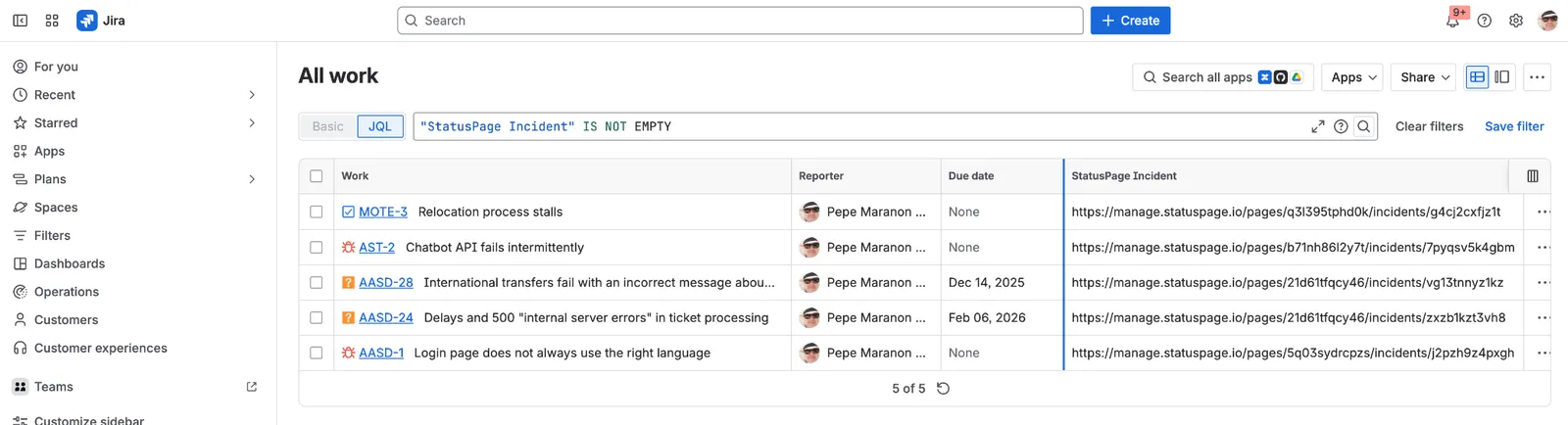
StatusPage Incident" IS NOT EMPTY
Option 2: Copy the data into the new Jira custom field
- Create a new Jira custom field, for example: Statuspage Incident URL.
- Copy the values from th original "StatusPage Incident" custom field into the new field. This can be done using Jira Automation, ScriptRunner, or another bulk update method.
Preserve your Statuspage history saved on Jira work items
What data is affected?
Incident Updates for Statuspage shows a Statuspage history tab in the Jira work item activity area.
Once the app is retired, Statuspage will retain all of your incident update activity, except for the user in Jira who sent the update. To retain this information, follow the steps below.
Preserve Statuspage history
- Open the Jira work item.
- Go to the work item activity area.
- Select Statuspage history.
- Copy the content in the Statuspage history.
- Paste it into the location you want it saved to.